
 30-minute setup






Access depends on individuals
Ad account and CMS logins are stored in personal browsers and inboxes, outside agency control.
How Passwork works
A vault for each client, owned by the agency.

Password and access management for marketing agencies
One place to manage who can access each client account. Access follows the project, and ownership stays with the agency
Trusted by top teams:



Ad account and CMS logins are stored in personal browsers and inboxes, outside agency control.
How Passwork works
A vault for each client, owned by the agency.
Account managers and freelancers move on, and their client logins keep working.
How Passwork works
Blocking a user ends every session at once.
A password posted in Slack or email remains visible to everyone in the thread.
How Passwork works
Share one login through a link that expires.
Under NIS2, regulated clients must secure their supply chain, and your agency is part of it.
How Passwork works
An activity log for every client login.
1.86M
email detections of campaigns stealing Meta Business Manager and Google Ads accounts in the second half of 2025, a record.
Mimecast, July 2026
55%
of GWA agencies surveyed in Germany had fewer permanent staff than a year earlier.
GWA Frühjahrsmonitor, March 2026 (92 agencies, weighted by revenue)
28%
of secret leak incidents start outside code, in tools like Slack and Jira.
GitGuardian, March 2026
€4.25M
average cost of a data breach at German companies in IBM's study.
IBM Cost of a Data Breach, July 2026
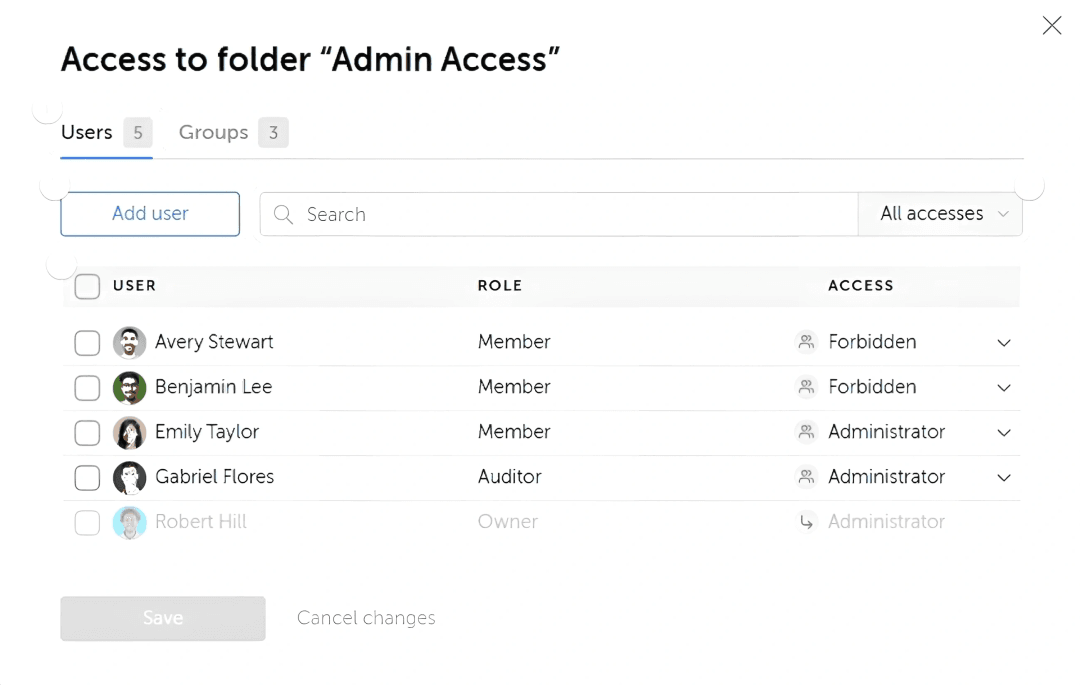
Create a vault for each client and a folder for each project. Assign rights to each person or group, from read only to administrator.
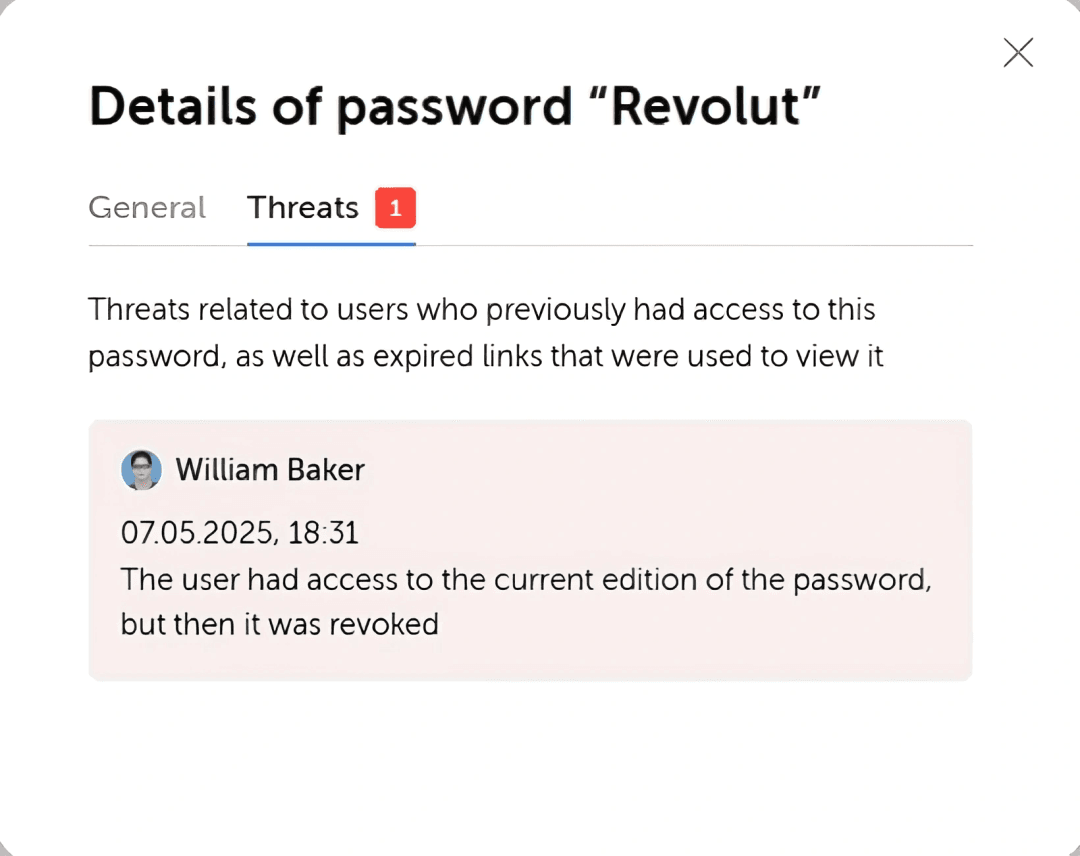
Blocking a user ends all their sessions at once. The security dashboard then flags every password they could access that has not been changed since, so your team knows which client logins to rotate.
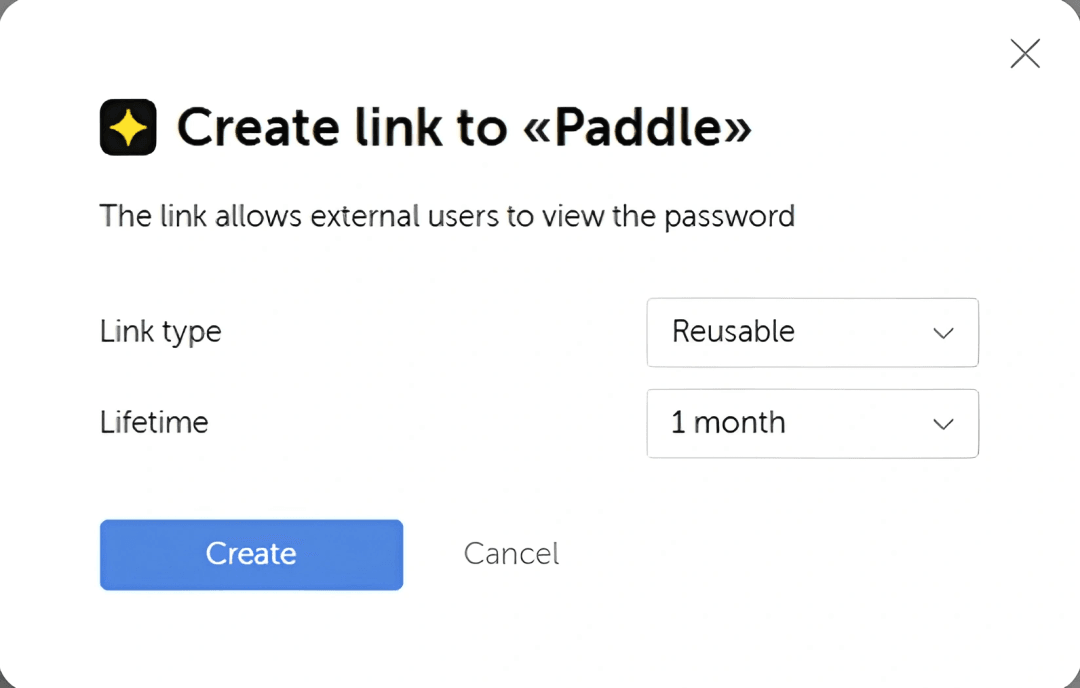
Send a single entry to a colleague, or share it with a freelancer or client through a link. Links can be single use or expire after an hour, a week or a month. Every opening is recorded.
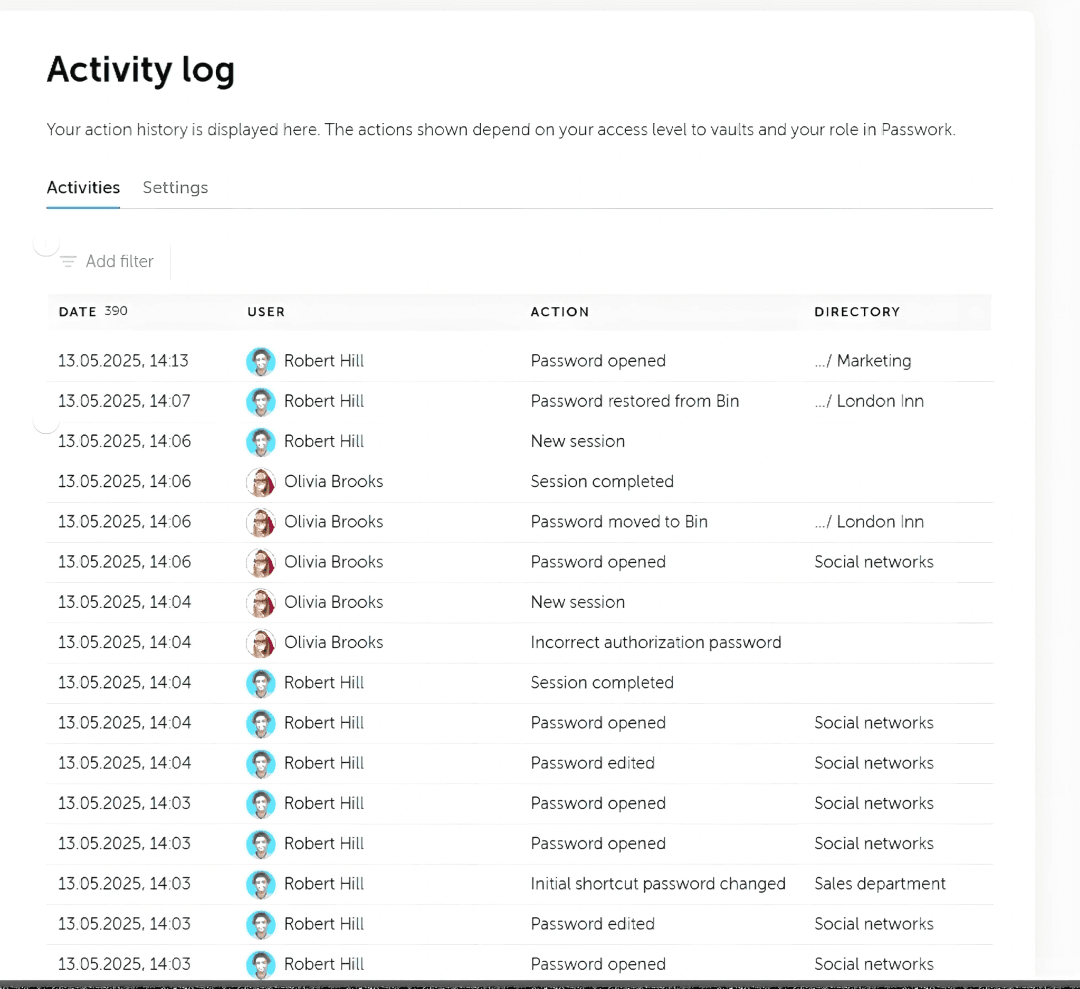
The activity log shows who opened or changed each client login and when. Every password keeps its full change history, and events can be forwarded to your SIEM.
Passwork runs on your own server. Move clients over one at a time, at your own pace.
Your IT team installs Passwork on a Linux or Windows server. Offline installation is supported.
Import from spreadsheets or KeePass. Migration guides cover 1Password, LastPass, RoboForm and Bitwarden.
Create a vault for each client and a folder for each project.
Invites can place each person directly in the right group. When a freelance project ends, deactivate the project group.
"Offboarding staff is now easy."
"Ease of sharing, especially the one-time expiring links."
Capterra, 8 April 2025
"We don't lose any time when onboarding new employees or freelancers, which makes working with Passwork very effective."
Capterra, 21 May 2025
"When someone leaves the team, we know exactly what needs to be rotated. That alone saves us hours and takes a lot of risk off the table."
G2, 25 April 2026
"...offboarding an employee meant manually chasing down shared passwords. Passwork provided us with a single, auditable source of truth."
G2, 24 April 2026
The results: Increasing operational efficiency for cross-border teams
Read full case study →Store the 2FA setup key of a shared client account in the entry, and the team sees the current code.
Store API keys and tokens for AI tools and hosting in the same vault as the client's logins.
Autofill in Chrome, Firefox, Edge and Safari. Desktop and mobile apps are also available.


Group entries by client or project with tags.
Require 2FA for each role. A passkey can serve as the second factor.
Generate passwords for new client accounts, up to 100 characters long.
Sign in through your SAML identity provider. With auto-deactivation on, people who are no longer in any mapped directory group are deactivated at the next sync.
Team leads manage only the people in their own department.
Security.

Passwork runs on your infrastructure. Offline installation is supported.

Data is encrypted with AES-256 on the server. Client-side encryption is an option you choose at installation.

Passwork is certified, certificate CERT-001724.

Tested by HackerOne, results published in July 2025.

Each licence includes the option to audit the source code.

Clients in NIS2 scope must secure their supply chain (§ 30(2) No. 4 BSIG). The activity log gives you an access record to show them.
Six points that decide how an agency controls client access, side by side with four other password managers.
Full comparisonThe feature column stays pinned. Swipe to see all five products.
| Features |
|---|
| Runs on your own server |
| Project folders inside each client vault, with rights on any folder |
| Agency admins locked into every new client vault |
| Expiring link for a freelancer or client |
| API keys for scripts and integrations in the same product |
| List price per user per month, billed annually |
| |  |  |  |  |
|---|---|---|---|---|
| Linux or Windows Server | Enterprise plan only | Cloud only | Vault in Keeper's cloud | Yes |
| Rights pass down the folder tree | Nested collections, each with its own rights | Rights per vault, no folders | Nested folder rights in invitation-only preview | Folder rights apply on create or move |
| Set per vault type (Advanced) | One organisation-wide admin setting | Admins by default, the vault creator can turn it off | Share Admin added to each folder by hand | Not available |
| Single use, or 1 hour to 1 month | Send link | Expiring link | One-Time Share | Not available |
| Included in Advanced | Secrets Manager, $6 to $12 extra per user | Included, through service accounts | Secrets Manager, paid add-on | Runs as a user seat |
| 3€ Standard 4,5€ Advanced | $6 Enterprise, the plan that self-hosts | $8.99 Business | $4 Business | €4.50 Pro, 10-user minimum |
Based on each vendor's public documentation and list prices in September 2026, in the currency each vendor publishes. Features and prices change, so check the vendor's site for current terms. Bitwarden, 1Password, Keeper and Passbolt are trademarks of their owners.
Pick a plan and the number of user seats to see your first-year price with the agency offer. Prices are per user per month, billed annually.
Essential features for small and medium businesses to support secure growth
Advanced capabilities for large-scale security and management needs
First-year self-hosted licence for new customers
The offer applies to trial and offer requests sent by 16 November 2026.
Prices exclude VAT and are billed annually. Each licence includes one year of updates and technical support.
Want to test Passwork first? . Need a quote for a larger team?
Special pricing for marketing agencies on the first-year self-hosted licence, Standard or Advanced.
If you haven't received the email, check your spam folder or contact us at [email protected]
Please click the button below to change the language
Switch to EnglishFill out the form below to get your copy of the report
Fill out the form below to get your copy of the NIS2 guide
Fill out the form below to get your copy of the compliance mapping
First-year self-hosted licence for new customers, Standard or Advanced.
Request by 16 November 2026.





 30-minute setup